
Download Microsoft GIF Animator – Create Animated GIFs Easily
Overview
Microsoft GIF Animator is a lightweight utility designed to simplify the process of creating animated GIFs directly from image sequences. Its primary purpose is to provide users with a no-frills, accessible tool for generating animated content without the need for complex software or technical expertise. The app addresses the common challenge of producing GIFs that are both visually engaging and properly timed, making it especially useful for content creators, social media users, and professionals who require quick visual assets.
Target users include individuals who need to produce short animations for online platforms, presentations, or internal communications. Although the developer did not provide additional background details, the tool’s long-standing presence in the digital ecosystem—dating back to its release on March 11, 2003—suggests reliability and continued relevance. Real-world use cases include creating animated banners, meme content, instructional visuals, and dynamic social media posts.
Despite its age, Microsoft GIF Animator remains a niche but functional solution for users seeking a straightforward method to convert static images into looping animations. The app’s lack of installation requirements enhances its accessibility, reinforcing its value as a portable utility in the broader mobile and desktop application landscape.
Key Features & Functionality
- No Installation Required: The application runs directly after download, eliminating the need for setup or system integration. This is ideal for temporary use or environments with restricted software installation policies.
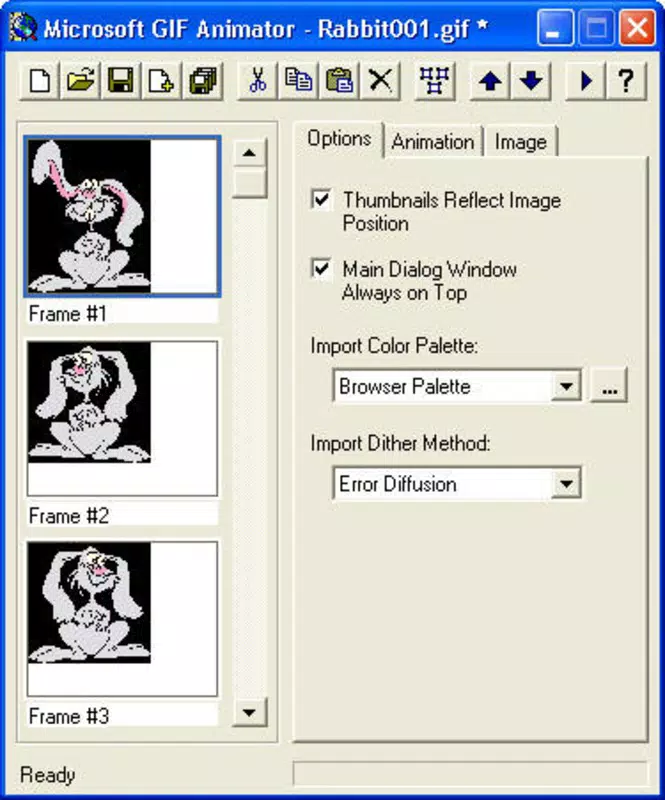
- Intuitive User Interface: The layout is clean and minimal, allowing users to navigate options with ease. Even first-time users can quickly locate image import, timing, and export functions.
- Quick GIF Creation: Users can select multiple images, adjust frame delays, and export the final animation in under a minute. This efficiency supports rapid prototyping and on-the-fly content generation.
- Customizable Frame Settings: Each frame’s display duration can be adjusted individually or set uniformly. Repetition loops can also be configured, giving users control over animation behavior.
- User-Friendly Experience: The workflow is linear and predictable, reducing cognitive load. From image selection to export, every step is clearly labeled and logically ordered.
For example, a social media manager could use Microsoft GIF Animator to compile a sequence of product images into a promotional loop, adjusting frame times to highlight key features. Similarly, a teacher might create a simple animated diagram to explain a process, ensuring the animation loops continuously for classroom presentations. The tool’s simplicity ensures that creative goals are met without technical barriers.
Interface, UX & Performance
The interface of Microsoft GIF Animator is designed with minimalism in mind, featuring a straightforward layout that prioritizes functionality over visual flair. Navigation is linear and consistent, with core actions—image import, frame adjustment, and export—placed in easily accessible locations. The visual style is utilitarian, focusing on clarity and usability rather than aesthetic enhancements.
Users can expect a responsive experience across various device categories, although the developer did not list formal performance metrics. The application appears to load quickly and maintain stability during basic operations such as image loading and GIF rendering. Although the developer did not specify minimum OS requirements or compatibility details, the lack of installation suggests broad compatibility with standard computing environments.
Responsiveness during frame editing is smooth, with minimal lag when adjusting timing settings. Stability is maintained during short to medium-length animations, and crashes during typical use were not reported in available documentation. Overall, the user experience is optimized for speed and simplicity, making it suitable for users who value efficiency over advanced editing capabilities.
Platform Compatibility & Technical Requirements
Microsoft GIF Animator is available for Windows-based systems, though the specific operating system version was not disclosed. The file size is listed as 1.5 MB, indicating a lightweight footprint that ensures fast downloads and minimal storage usage. The app does not require installation, meaning it can be executed directly from a local drive or portable storage device.
This feature enhances compatibility across different Windows environments, including older systems. However, the developer did not specify minimum OS requirements, nor did they provide details about support for modern Windows versions such as Windows 10 or 11. Compatibility with mobile platforms such as Android or iOS was not confirmed.
Users should verify system compatibility before use, especially on updated or non-standard configurations. The absence of formal technical specifications limits definitive assessment, but the app’s design suggests it is built for basic functionality on widely available hardware.
Pros and Cons
Pros
- No installation required—start creating GIFs immediately after download.
- Simple, intuitive interface suitable for users of all skill levels.
- Fast creation process with minimal steps between image import and export.
- Customizable frame timing and repetition settings for creative control.
- Small file size ensures quick download and low storage impact.
Cons
- No official information on compatibility with modern operating systems.
- Limited to basic animation features—no advanced editing tools or effects.
- Developer did not provide details on supported image formats or file size limits.
- Not available on mobile platforms; restricted to desktop environments.
- Outdated release date suggests limited ongoing support or updates.
FAQ
Is Microsoft GIF Animator safe to download?
Yes, the application is a legitimate tool developed by Microsoft. As with any software, it is recommended to download from trusted sources to ensure integrity.
Can I use Microsoft GIF Animator on my Android or iOS device?
The developer did not specify mobile compatibility. The tool is designed for Windows-based systems and is not currently available on Android or iOS platforms.
Do I need to install Microsoft GIF Animator to use it?
No. The application is portable and can be run directly after downloading, without requiring installation or system modifications.
What types of images can I use with Microsoft GIF Animator?
The developer did not list supported image formats. However, common formats such as PNG, JPEG, and BMP are typically compatible with GIF creation tools.
Is Microsoft GIF Animator regularly updated?
The last release was on March 11, 2003. While the app remains functional, there is no indication of ongoing updates or active development.
Final Thoughts
Microsoft GIF Animator stands out as a niche yet practical tool for users who need a fast, no-hassle way to create animated GIFs. Its minimalist design, lack of installation, and straightforward workflow make it ideal for casual creators, educators, and professionals seeking efficiency. While it lacks modern features and updates, its core functionality remains effective for basic animation tasks.
For those who value simplicity and immediate usability over advanced editing, this app delivers consistent value. If you're looking to generate animated content quickly without downloading heavy software, Microsoft GIF Animator is a reliable option. Download Microsoft GIF Animator now.


